
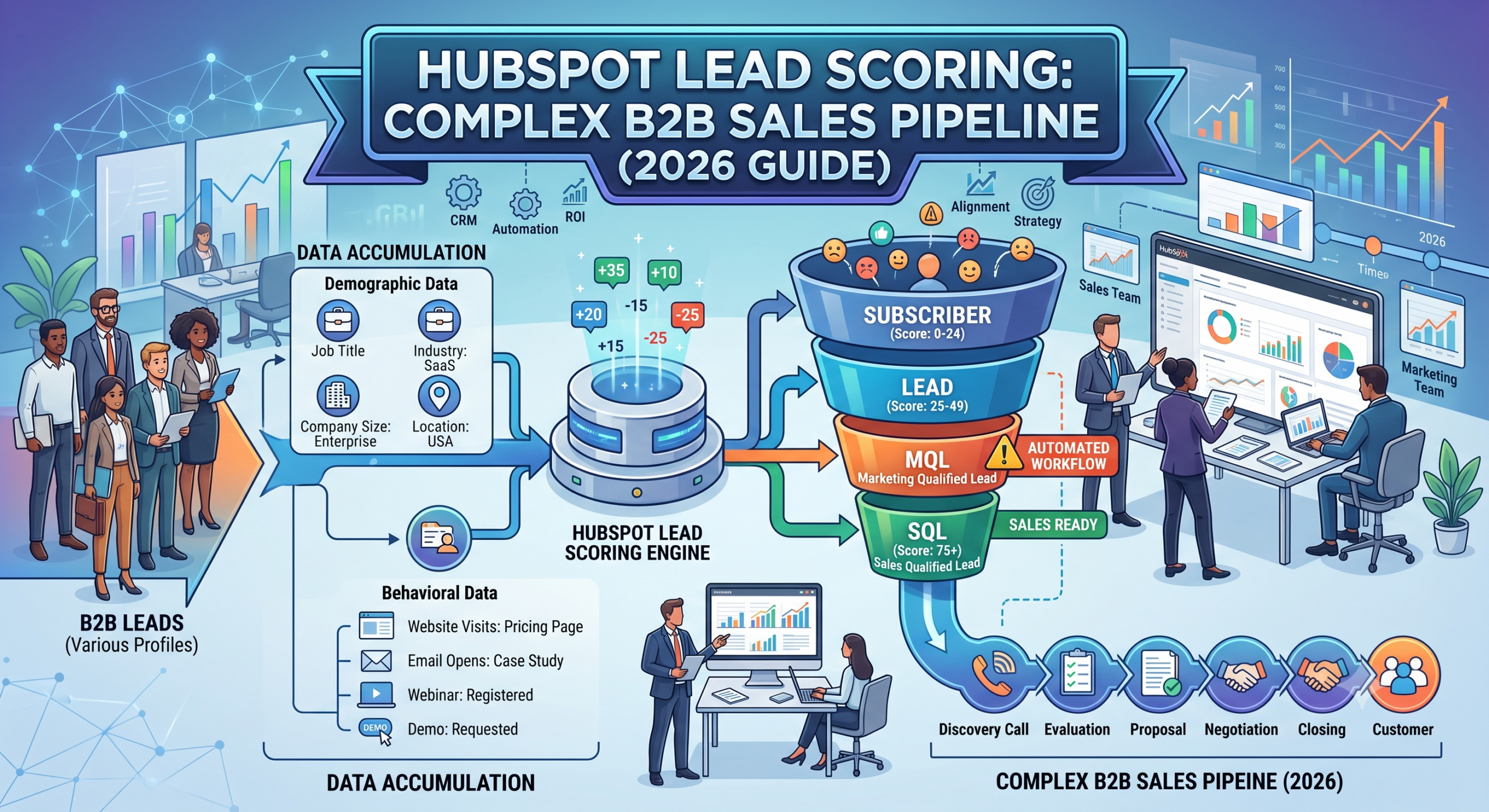
How to Set Up HubSpot Lead Scoring for Complex B2B Sales Pipelines (2026 Guide)
A complete, step-by-step strategy to qualify high-intent prospects, align marketing and sales, and scale revenue.
In today's competitive B2B landscape, generating leads is only half the battle. The real challenge lies in identifying which prospects are genuinely ready to buy and which ones need more nurturing. Sales teams often spend countless hours contacting leads that are unlikely to convert, while high-value prospects may be overlooked because they are buried in an overflowing CRM.
This is where HubSpot Lead Scoring becomes a game-changing strategy. By assigning values to contacts based on their profile, company information, and engagement with your business, you can prioritize leads with the highest likelihood of becoming customers. Instead of relying on guesswork, your sales and marketing teams make decisions based on measurable data and buying signals.
For businesses with complex B2B sales pipelines, lead scoring is even more valuable. Enterprise sales cycles are typically longer, involve multiple stakeholders, and require several touchpoints before a decision is made. A single prospect may download a whitepaper, attend a webinar, visit your pricing page multiple times, and request a product demo before becoming sales-ready. Without an intelligent scoring model, it's difficult to determine when a lead is ready to move from marketing to sales.
According to Gartner B2B Sales Research, B2B buying decisions are rarely made by one person. Large organizations often involve decision-makers from different departments, including executives, finance teams, IT specialists, procurement managers, and operational leaders.

HubSpot offers flexible lead scoring capabilities that help organizations automate this process. Whether you're a SaaS company, consulting firm, manufacturing business, financial services provider, or digital agency, a well-designed lead scoring system can improve sales productivity, reduce customer acquisition costs, and increase conversion rates.
What Is HubSpot Lead Scoring?
HubSpot Lead Scoring is a feature within HubSpot CRM that allows businesses to assign numerical values to contacts based on predefined rules. If you need technical setup instructions for these rules, the HubSpot Knowledge Base provides excellent step-by-step documentation. These rules evaluate how closely a lead matches your ideal customer profile and how actively they engage with your business.
Every interaction a prospect has with your company contributes to their overall score. For example, visiting your pricing page, downloading a case study, attending a webinar, or requesting a demo can all increase a lead's score. On the other hand, inactivity, unsubscribing from emails, or repeatedly visiting your careers page may reduce their score.
The purpose of lead scoring is simple: help your sales team focus on the prospects most likely to convert. Rather than treating every lead equally, HubSpot allows you to rank contacts based on their likelihood of becoming paying customers. This improves efficiency, shortens the sales cycle, and ensures that high-intent prospects receive prompt follow-up.
Why Lead Scoring Is Essential for Complex B2B Sales Pipelines
Because of enterprise buying complexity, relying on a single form submission or one website visit isn't enough to determine purchase intent. A robust lead scoring model helps organizations:
- Prioritize high-value prospects based on real buying signals.
- Reduce time spent on unqualified leads.
- Improve collaboration between sales and marketing teams.
- Increase conversion rates from Marketing Qualified Leads (MQLs) to Sales Qualified Leads (SQLs).
- Shorten enterprise sales cycles.
- Improve forecasting accuracy.
- Deliver personalized follow-up based on engagement levels.
- Increase overall return on marketing investment (ROI).
Understanding the Two Foundations of Lead Scoring
An effective lead scoring model combines two primary elements:
1. Demographic and Firmographic Data
This refers to information about the individual and their organization. Common factors include:
- Job title and Department
- Seniority level
- Company size and Industry
- Annual revenue
- Geographic location
- Technology stack and Business type
These attributes help determine whether a lead matches your Ideal Customer Profile (ICP). For example, if your software primarily serves enterprise healthcare organizations, a Chief Technology Officer at a 500-employee healthcare company should receive a much higher score than a student downloading a free resource.
2. Behavioral Data
Behavioral scoring measures how prospects interact with your business over time. Examples include:
- Visiting product pages and Reading blog articles
- Downloading eBooks and Watching product videos
- Opening marketing emails and Clicking links in newsletters
- Registering for webinars and Booking sales meetings
- Requesting product demonstrations
Behavior often provides stronger buying signals than demographic data because it reflects genuine interest. Someone who visits your pricing page five times in one week is generally much closer to making a purchase than someone who downloaded a single educational guide six months ago.
Benefits of Using HubSpot Lead Scoring
Better Sales Productivity: Sales representatives no longer waste valuable hours contacting every lead in the database. Instead, they focus on prospects with the highest scores.
Improved Marketing ROI: Marketing campaigns generate numerous leads, but not all are equally valuable. Lead scoring helps marketers understand which channels, campaigns, and content pieces produce qualified prospects.
To deepen your internal team's expertise on pipeline management, we highly recommend having them complete certifications through the HubSpot Academy.
Traditional Lead Scoring vs Predictive Lead Scoring
Businesses generally use one of two approaches to lead scoring:
Traditional Lead Scoring: Based on manually assigning points to different behaviors and attributes (e.g., CEO = +30, Pricing Page Visit = +20). This approach is easy to customize and works well for organizations that understand their customer journey.
Predictive Lead Scoring: Uses artificial intelligence and historical conversion data to identify patterns among customers who have previously converted. Instead of relying solely on manually assigned rules, AI analyzes thousands of data points to predict which prospects are most likely to become customers.
Step 1: Define Your Ideal Customer Profile (ICP)
Before assigning points to any lead, you need a clear understanding of your ideal customer. Your Ideal Customer Profile represents the type of organization most likely to benefit from your products or services and generate long-term value.
When building your ICP, consider factors such as Company Size, Industry, Annual Revenue, and Geographic Location.
| Job Title (Decision Makers) | Score |
|---|---|
| CEO / Founder | +35 |
| President | +30 |
| Vice President | +25 |
| Director | +20 |
| Manager | +15 |
| Team Lead | +10 |
| Executive Assistant | +5 |
Building an Advanced HubSpot Lead Scoring Model
Now that you've defined your Ideal Customer Profile (ICP), it's time to create a scoring system that accurately reflects both who your prospects are and how interested they are in your solution. This is where many businesses struggle. They often assign points based on a few website visits or email opens without considering the complete buyer journey.
A high-performing HubSpot Lead Scoring model should evaluate a combination of demographic fit, engagement, buying intent, and account activity. Ensuring your landing pages rank well so prospects can actually find you involves adhering to guidelines from Google Search Central.

Step 2: Build a Multi-Dimensional Lead Scoring Framework
Rather than relying on a single score, divide your lead scoring strategy into multiple categories. This approach provides greater accuracy and makes it easier to understand why a contact is considered sales-ready.
- Fit Score: Does the Lead Match Your Ideal Customer? (Max 100 Points).
- Engagement Score: How Interested Is the Prospect? (Tracks active interaction).
- Buying Intent Score: Is the Prospect Ready to Purchase? (Focuses on active evaluation).
- Account Score: Measures the combined engagement of everyone within a company (Account-Based Marketing).
| Example Fit Attributes | Score |
|---|---|
| SaaS Company | +20 |
| 200–1,000 Employees | +20 |
| Annual Revenue Above $10M | +20 |
| Director or VP | +20 |
| Located in USA, UK, Canada, or Australia | +10 |
Step 3: Assign Positive and Negative Scores
An effective lead scoring model rewards desirable behaviors while reducing scores for signals that suggest low purchase intent.
| Behavior (Positive vs Negative) | Score |
|---|---|
| Demo Request | +60 |
| Multiple Pricing Page Visits | +30 |
| Webinar Attendance | +20 |
| No Activity for 60 Days | -20 |
| Email Unsubscribe | -25 |
| Spam Form Submission / Competitor Domain | -100 / -50 |
Step 4: Use Score Decay to Keep Scores Accurate
One common mistake businesses make is treating lead scores as permanent. In reality, buyer intent changes over time. A prospect who downloaded a guide nine months ago shouldn't receive the same priority as someone who booked a demo yesterday. Score decay gradually reduces a contact's score after periods of inactivity.
| Inactivity Period | Score Reduction |
|---|---|
| 14 Days | -5 |
| 30 Days | -10 |
| 60 Days | -20 |
| 90 Days | -35 |
| 180 Days | Move to Long-Term Nurture |
Step 5: Create Marketing Qualified Lead (MQL) Thresholds
After assigning scores, determine when a lead is ready to move through your sales funnel. Many organizations define clear score ranges for each lifecycle stage.
| Total Score | Lifecycle Stage |
|---|---|
| 0–24 | Subscriber |
| 25–49 | Lead |
| 50–74 | Marketing Qualified Lead (MQL) |
| 75–99 | Sales Accepted Lead (SAL) |
| 100+ | Sales Qualified Lead (SQL) |
Step 6: Create Product-Specific Lead Scores
If your business offers multiple products or services, a single lead score may not provide enough context. Instead, create separate scoring models for each offering (e.g., CRM Software Score vs. Marketing Automation Score vs. Consulting Services Score). This helps sales teams understand exactly which solution a prospect is interested in.
Automation, Reporting, Optimization, and Best Practices
Step 7: Automate Lead Management with HubSpot Workflows
One of HubSpot's greatest strengths is its workflow automation. Instead of manually reviewing every contact, you can create workflows that automatically respond to changes in lead scores. For example, when a contact reaches a score of 75 or higher, HubSpot can instantly update the lifecycle stage to MQL, assign the contact owner, create a sales task, and enroll the contact in a sales email sequence.
Step 8: Use Predictive Lead Scoring
Traditional lead scoring relies on manually assigned point values, but as your database grows, maintaining these rules becomes more challenging. HubSpot's predictive lead scoring uses artificial intelligence and machine learning to analyze historical customer data. It identifies patterns among contacts who converted into customers and predicts which current leads are most likely to do the same.
Step 9: Build Custom Lead Scoring Dashboards
A scoring model is only effective if you can measure its impact. HubSpot's reporting tools allow you to create dashboards that monitor key lead scoring metrics, such as Lead Distribution Report, Conversion Rate by Lead Score, Sales Response Time, and Revenue by Lead Score.
Step 10: Continuously Optimize Your Lead Scoring Model
Lead scoring should never remain static. Markets evolve, buyer behavior changes, and new products may attract different customer segments. Review your scoring model regularly by asking questions such as: Which high-scoring leads actually became customers? Are there behaviors receiving too many or too few points?
How AI Is Transforming HubSpot Lead Scoring
Artificial Intelligence is rapidly changing how B2B companies qualify leads. Instead of relying solely on manually assigned points, modern sales teams can analyze thousands of data points simultaneously to identify prospects with the highest probability of conversion. HubSpot's AI-powered capabilities help businesses recognize buying patterns that would be difficult to detect manually.
Integrating Lead Scoring with Your Sales Pipeline
Lead scoring is most effective when it is directly connected to your sales pipeline. As a contact's score increases, their position within the sales process should update automatically.
| Lead Score | Pipeline Stage | Recommended Action |
|---|---|---|
| 0–25 | New Lead | Enroll in educational email sequence |
| 26–50 | Engaged Lead | Continue nurturing with relevant content |
| 51–75 | Marketing Qualified Lead | Notify marketing and assign to SDR |
| 76–100 | Sales Accepted Lead | Schedule discovery call |
| 100+ | Sales Qualified Lead | Prepare proposal and sales presentation |
Lead Scoring KPIs You Should Monitor
Implementing lead scoring is only the first step. Measuring performance is equally important. Track these key performance indicators (KPIs):
- MQL to SQL Conversion Rate: Measures how effectively marketing-qualified leads become sales-qualified leads.
- SQL to Customer Conversion Rate: Indicates how well your sales team converts qualified opportunities into paying customers.
- Average Sales Cycle Length: Compare the average time to close deals before and after implementing lead scoring.
- Average Deal Value: Determine whether higher-scoring leads generate larger contracts.
- Cost per Qualified Lead: Evaluate the efficiency of your marketing campaigns by focusing on lead quality rather than lead volume.
Common HubSpot Lead Scoring Mistakes to Avoid
- Assigning Too Many Points for Low-Intent Actions: Opening an email or reading one blog post doesn't necessarily indicate buying intent. Higher scores should be reserved for actions like demo requests.
- Ignoring Negative Scoring: Only adding positive points causes inactive or unqualified leads to remain highly ranked in your CRM.
- Not Using Score Decay: Buying intent decreases over time. Without score decay, leads who engaged months ago may still appear highly qualified.
- Failing to Align Sales and Marketing: Marketing and sales teams should agree on what qualifies as an MQL and when leads should be handed to sales.
- Treating Every Business the Same: Customize your scoring criteria based on your exact industry, products, and customer journey.
HubSpot Lead Scoring Best Practices for Long-Term Success
- Define a clear Ideal Customer Profile before assigning points.
- Combine demographic, firmographic, and behavioral data.
- Prioritize high-intent actions over low-value engagement.
- Use separate scores for different products or services when appropriate.
- Automate lead routing using HubSpot workflows once thresholds are met.
- Regularly review conversion data and adjust scoring rules every quarter.
Final Checklist for Setting Up HubSpot Lead Scoring
- Defined your Ideal Customer Profile (ICP)
- Identified high-intent buying signals
- Assigned positive and negative scores
- Implemented score decay
- Created MQL and SQL thresholds
- Built HubSpot workflows for automation
- Integrated lead scoring with your sales pipeline
- Set up reporting dashboards
Frequently Asked Questions (FAQs)
What is HubSpot Lead Scoring?
HubSpot Lead Scoring is a CRM feature that assigns numerical values to contacts based on their profile and behavior, helping businesses prioritize the leads most likely to become customers.
How does HubSpot Lead Scoring work?
HubSpot Lead Scoring works by evaluating interactions. Every action—like visiting a pricing page or opening an email—adds or subtracts points based on your customized criteria.
Is HubSpot Lead Scoring suitable for small businesses?
Yes. Even small businesses can benefit from HubSpot Lead Scoring by focusing limited sales resources on high-quality prospects and reducing time spent on low-intent leads.
Can HubSpot Lead Scoring automate lead qualification?
Yes. By pairing HubSpot Lead Scoring with workflows, you can automatically assign leads, update lifecycle stages, and notify sales representatives when a prospect reaches a certain threshold.
What is a good lead score in HubSpot?
A good score in HubSpot Lead Scoring depends on how you configure your point values, but generally, a score of 75-100 indicates a highly qualified, sales-ready prospect.
Conclusion
HubSpot Lead Scoring is much more than a simple points system—it's a strategic framework for aligning marketing and sales around the prospects most likely to convert. By combining demographic information, behavioral signals, buying intent, and account-level engagement, businesses can prioritize the right opportunities, shorten sales cycles, and improve overall revenue performance.
The most successful strategies are never static. They evolve with your business, customer behavior, and market conditions. By regularly reviewing performance data, refining your rules, and leveraging automation, investing in HubSpot Lead Scoring today will help your organization create a predictable sales pipeline, improve customer experiences, and drive sustainable, high-ticket revenue growth for years to come.
Ready to Improve Your B2B Lead Qualification?
Whether you're implementing HubSpot CRM for the first time or optimizing an existing sales process, Creativephy can help you build intelligent lead scoring models, automate workflows, and create high-converting sales funnels.
Contact us today for a customized CRM strategy that supports sustainable business growth.